
Video playback and OBS capture
From 2.2.1.0, play MP4/MOV duet videos and save gain and chroma key settings separately for each song.
- Add a videoDrop an MP4/MOV into the song list or use Import accompaniment.
- Play and previewOpen Video screen after playback starts. Audio stays in the main player; Play, Stop and the seek slider in the video window control that same player.
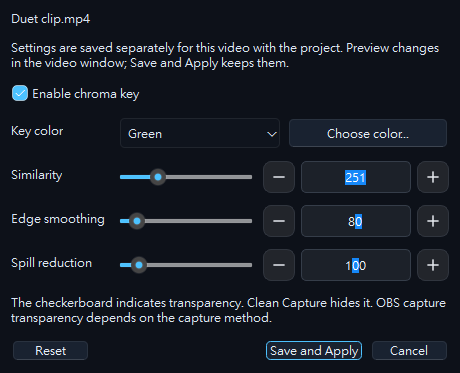
- Set up each videoIn Song settings → Video, set the chroma key color, similarity, smoothness and spill reduction. Save the settings and project to retain separate parameters for each video.
- Transparent video in OBSSelect Clean capture in S3S, then add an OBS Window Capture source for Video screen — Clean capture. Choose Windows 10 (1903 and up) and require the window title to match.
- Play/pause and stop stay synchronized with the main player.
- Seek with the progress slider.
- Choose the output size.
- Adjust and save chroma key for this video.
- Enter clean capture; press Esc or right-click to return.
Place a background source underneath to check transparency. The checkerboard is only an editing aid. A MOV that already contains alpha needs no chroma key; the MOV extension alone does not guarantee alpha.
Press Esc or use the context menu to return to controls. You can also reopen Video screen from the main player. Keep the window behind other windows when needed; do not rely on minimizing it for capture.
Keep your existing S3S audio source in OBS; do not capture the same video audio twice.
Song volume balance
Enable automatic song volume balance in Settings. The default −18 LUFS-I is a starting point for accompaniment, not a YouTube upload requirement. The feature is off by default; completed analysis applies on the next playback, never suddenly during a song.
Gain shows the total. Expand it to see automatic compensation and manual trim. Each step is 0.5 dB; reset clears only manual trim. Manual gain is saved with the project. BGM is unaffected.
Local audio and video soundtracks can be analyzed. Online YouTube streams cannot yet be analyzed directly; manual trim remains available. Any duet voice already mixed into a video is adjusted together with its music.
Automatic upward compensation is capped at +6 dB and limited by source peak headroom. It preserves dynamics and does not modify original files. OBS dBFS meters are not LUFS measurements; record a short test to check the final voice/music balance and distortion.