Other tools
Useful tools made by Noon. Download an app or explore its source code.

FanArtDownloader
Collect FanArt images and videos from X on your computer using the tags you choose.
Cloudflare R2 · EXE · 59.4 MiB
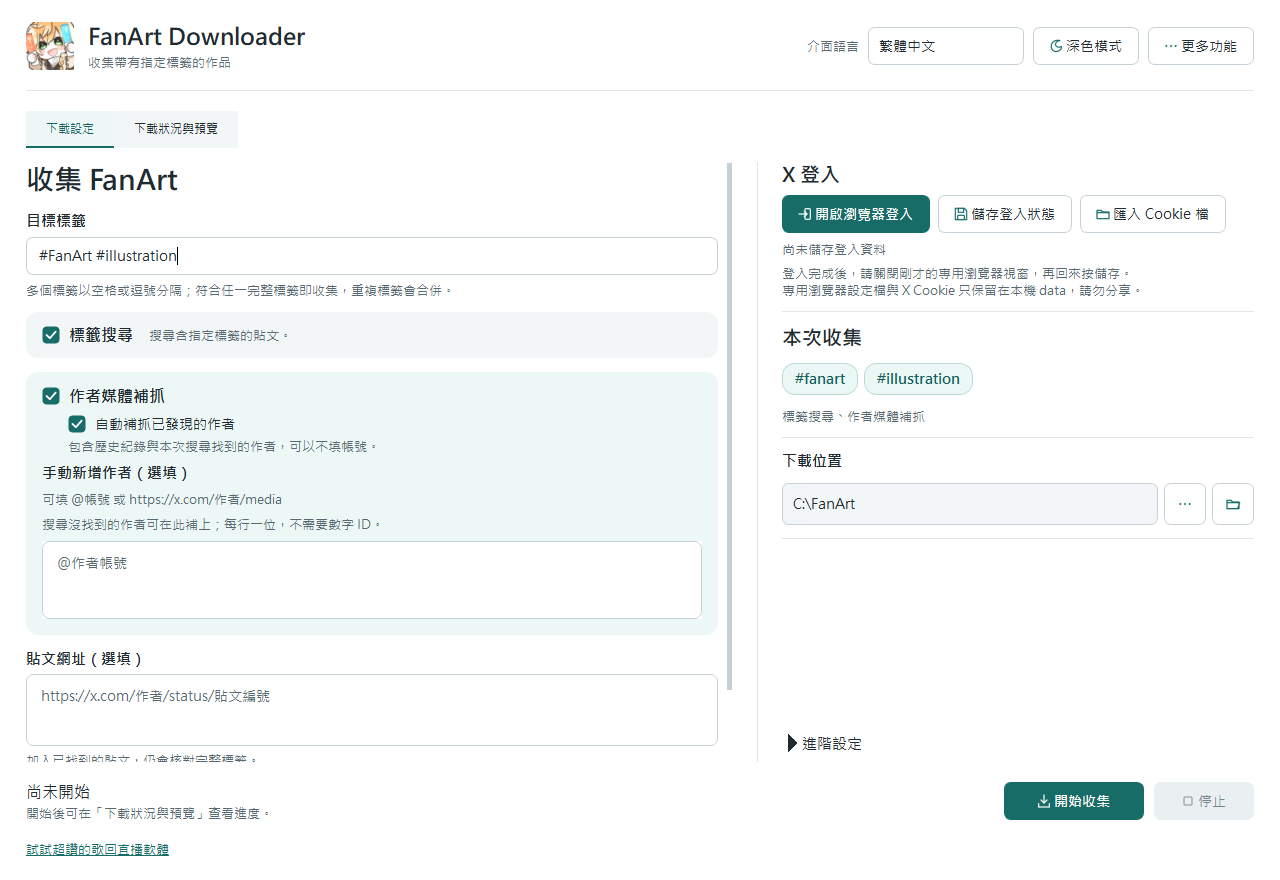
What it does
- Search multiple exact tags and backfill matching works from discovered authors’ media pages.
- Paste post URLs to download works matching your target tags. Also collect media replies by the same author in those threads. Same-author reply backfill is off by default; enable it when needed (takes extra time to load).
- Keep progress in SQLite, avoid duplicates, resume unfinished sources, filter history and download selected items again.
Get started
- Download the EXE, place it in your own folder and open it.
- Sign in to X in the app’s dedicated browser. Close that window, then save the login state in the app.
- Enter target tags and optionally add post URLs. Choose a download folder and start collecting.
Login and local data
Download history and the dedicated browser’s login data stay on your computer. Cookies can grant access to your account: do not share the data folder. You can clear local login data in the app; this does not revoke sessions on X’s servers.
Collection limits
Uses gallery-dl to collect content accessible on X. Collection cannot be guaranteed for works X does not return, deleted works or posts your account cannot access. Respect creators’ rights and the platform’s rules.
Download details and SHA-256
- File
XFanArtDownloader.exe- Size
- 62297759 bytes
- SHA-256
5d4598dfc803aeed294d4e801120fd1e175e814875e40e6504025e4f54478413