
Software download
Currently unsigned. Windows may show an unknown publisher. Check the download source and SHA-256. Security details →
ZIP SHA-256
76a9cc930cb461df1557539f1b5f52f32c82e15e2c8d890026e9d0f86b26a0aaBefore downloading: check your PC
- Tested platform
- Windows 11 (x64). A tested minimum Windows version, CPU and RAM requirement has not been published.
- Architecture
- This download is the Windows x64 build.
- Disk space
- Allow space for the extracted app, songs, UVR output and update files. Songs, UVR output, update files and backups need additional space.
- Basic playback
- Requires a working audio output device. Local files and BGM work offline; UVR and vocal effects are optional.
- UVR vocal removal
- Runs additional model inference on CPU, with optional GPU/DirectML acceleration. Processing time and resource use depend on the model and song.
- Vocal effects
- Requires a microphone and audio routing. Effect count, VST3 plugins and audio buffers affect load and latency. VST3 plugins must be Windows x64 builds.
How to open the extracted app
Extract the ZIP, then open “Singing Stream Savior.exe” in the top-level folder. It also shows the version-check status and asks before installing a future update. Do not move the internal DLLs or folders separately.
Download from Cloudflare R2 first. If it is slow or unavailable, use the GitHub backup. Both provide the same complete ZIP.
Security details
Seeing a Windows protection message on first launch?
Singing Stream Savior is independently developed by one person, and its Windows executable is not yet signed with a trusted code-signing certificate. SmartScreen may therefore show an unknown publisher or unrecognized app warning. Unsigned does not mean malicious, but Windows cannot use a certificate to verify the publisher or detect tampering.
-
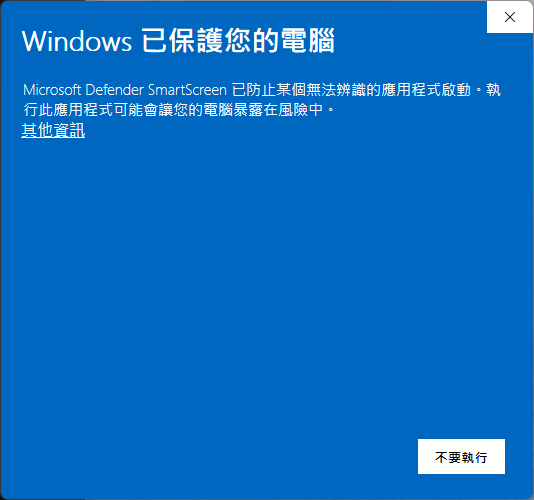
Select “More info”This reveals the application name and the hidden run option. -
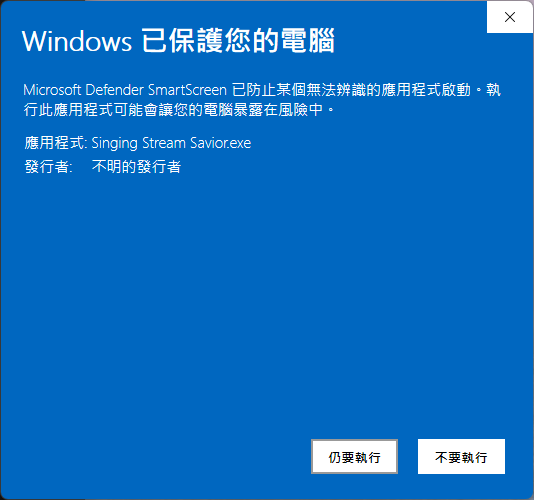
Select “Run anyway”Continue only when the download source is correct and the SHA-256 above matches the file.
Download only from this page or the official NoonIsAwesome/Singing-Stream-Savior-Updates GitHub Release. SHA-256 verifies that your download is identical to the published file.
Unsigned independent software can sometimes trigger heuristic false positives, including during the developer’s own testing. Update the antivirus definitions and verify the official source, filename, and SHA-256. Do not run the file if those details differ.
The app requires no registration or login and contains no advertising, user tracking, or analytics telemetry. It does not upload songs, lyrics, audio, microphone content, projects, or personal files to the developer.
Projects, settings, and audio processing remain on your computer. Only optional features such as YouTube, online lyric or cover searches, and update checks connect to the relevant third-party service.
Operation videos
Short videos based on the actual app interface will cover first-time setup, OBS output, and lyrics.
Singing Stream Savior × OBS workflow demo
A real workflow showing karaoke playback, theme switching, synchronized lyrics, and the final OBS output.
You can even use it to practise songs
Select the lyric you want to practise and the karaoke track jumps to its timestamp—no more guessing the section on the player timeline. This demo is silent.
Card list and BGM playlist quick demo
Shows how to switch song-list views, use the card layout, and change background music from the BGM playlist. This silent demo uses the Traditional Chinese interface.